Sharing is the last step of the Website editor. It sets what guests see the moment you send your invitation: the preview card that appears with your link, and the message that goes with it.
At the top, a picture of a WhatsApp chat shows your invitation exactly as guests will get it. It updates as you type.
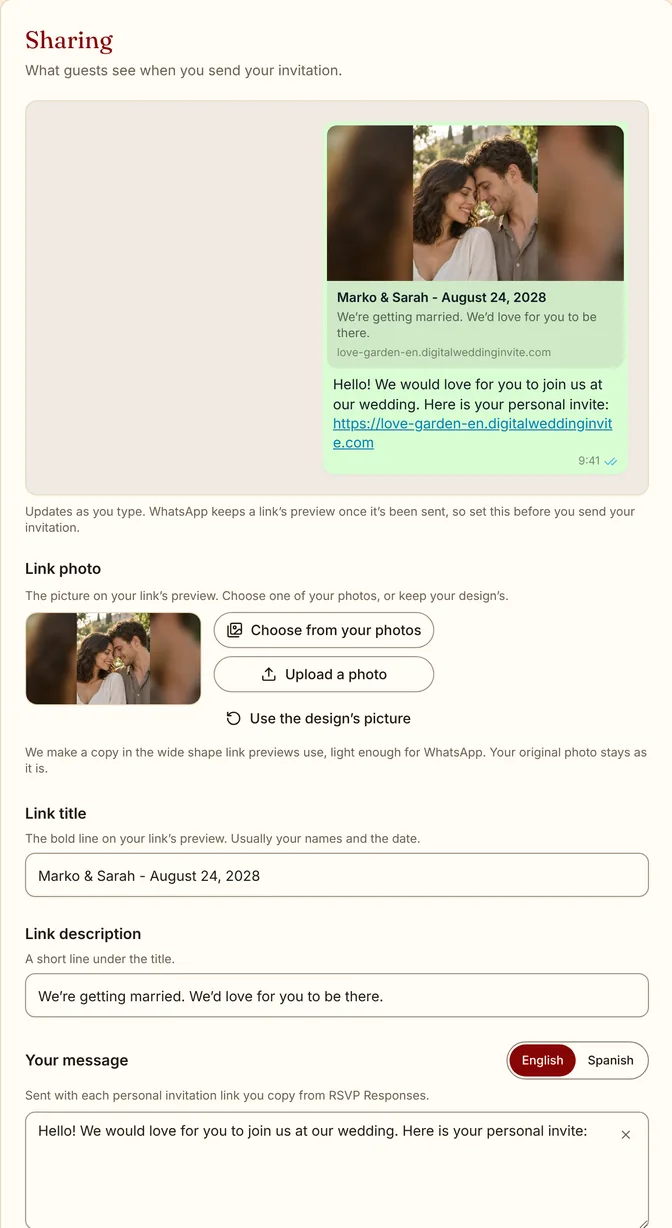
Link photo
The picture on your link’s preview. Tap Choose from your photos to use one you’ve added in Your Photos, or Upload a photo.
We make a copy shaped for link previews and light enough for WhatsApp to show. Wide photos fill the card; taller ones are shown whole, with a soft, blurred edge on either side. Your original photo isn’t changed.
Changed your mind? Use the design’s picture brings back the one your invitation came with.
Link title and description
- Link title is the bold line on the preview. Your names and the date work well, like Marko & Sarah · 24 August 2028.
- Link description is the short line under it, like We’re getting married. We’d love for you to be there.
Your message
The words sent with every personal invitation link you copy from RSVP Responses, e.g. “We’re getting married! Here’s your invitation, please reply by…”
The same message goes to everyone. Only the link changes, so don’t include names in it. If your invitation has two languages, write it in each one with the language switch.
Press Save when you’re done.
Set this before you send. WhatsApp remembers a link’s preview the first time it’s shared. If you change the photo or title afterwards, chats that already have your link may keep showing the old one.
Getting here
From RSVP Responses, tap Message & link preview above your invitations. In the Website editor’s RSVP step, Sending your invitation? takes you here too.
Ready to send? Send each guest their personal link →